Duplicate Receipts – How to Detect
Duplicate receipts cause inaccurate reporting, double reimbursements, and audit risks. Learn what they are, why they happen, and how to detect and prevent them with structured scanning and AI.
❓ FAQ – Duplicate Receipts: What You Need to Know
What is a duplicate receipt?
A duplicate receipt is a repeated record of the same transaction entered more than once in your accounting, expense, or bookkeeping system.
Why are duplicate receipts a problem?
They cause inaccurate financial reporting, double reimbursements, tax filing errors, and audit risks.
How can I detect duplicate receipts automatically?
Use structured receipt scanning tools like ReceiptRecon that compare vendor name, date, invoice number, tax amount, and total to identify matching or near-matching entries.
Are duplicate receipts considered fraud?
Sometimes. According to the Association of Certified Fraud Examiners, duplicate reimbursements are a common expense fraud method.
Can duplicate receipts impact GST/VAT compliance?
Yes. Tax authorities like the Internal Revenue Service and Central Board of Indirect Taxes and Customs require accurate expense records. Duplicate claims may trigger scrutiny.
📑 Table of Contents
- What Are Duplicate Receipts?
- Why Duplicate Receipts Happen
- Real Statistics & Financial Impact
- Manual vs Automated Detection
- Step-by-Step Detection Guide
- Comparison Table: Detection Methods
- Warning Signs of Duplicate Receipts
- How ReceiptRecon Detects Duplicates
- Duplicate Receipt Detection Flow
- Duplicate vs Legitimate Reissue
- Best Practices to Prevent Duplicates
- Why This Matters for Tax Compliance
1️⃣ What Are Duplicate Receipts?
A duplicate receipt occurs when:
- The same transaction is recorded twice
- A reimbursement is submitted multiple times
- A digital and paper copy are both entered separately
- Slight edits (e.g. tax rounding) create near-identical entries
Duplicate receipts are common among freelancers, SMBs, e-commerce sellers, real estate agents, and remote teams.
2️⃣ Why Duplicate Receipts Happen
Common causes:
- Manual data entry errors
- Multiple employees submitting the same expense
- Accounting software sync issues
- Credit card + manual entry duplication
- Poor document organization
- Vendor sending revised invoice without voiding the old one
Platforms like QuickBooks and Xero reduce risk, but duplicates still occur if workflows are not controlled.
3️⃣ Real Statistics & Financial Impact
According to the Association of Certified Fraud Examiners:
- 5% of annual revenue is lost to fraud globally
- Expense reimbursement fraud accounts for ~15% of occupational fraud cases
- Median loss per case: $40,000+
In India, GST mismatch notices often arise from duplicate ITC claims, multiple invoice uploads, and supplier reconciliation errors. Even small businesses lose thousands annually from unnoticed duplicate receipts.
4️⃣ Manual vs Automated Detection
Manual detection
Export expenses to a spreadsheet, sort by vendor/date/amount, use “Remove Duplicates,” check invoice numbers and tax fields manually. Limitations: time-consuming, misses near-duplicates (e.g. ₹1 rounding), not scalable.
Automated detection
Modern tools use OCR, fuzzy matching, invoice number hashing, tax field validation, and merchant ID comparison. ReceiptRecon applies structured data extraction and pattern matching.
5️⃣ Step-by-Step: How to Detect Duplicate Receipts
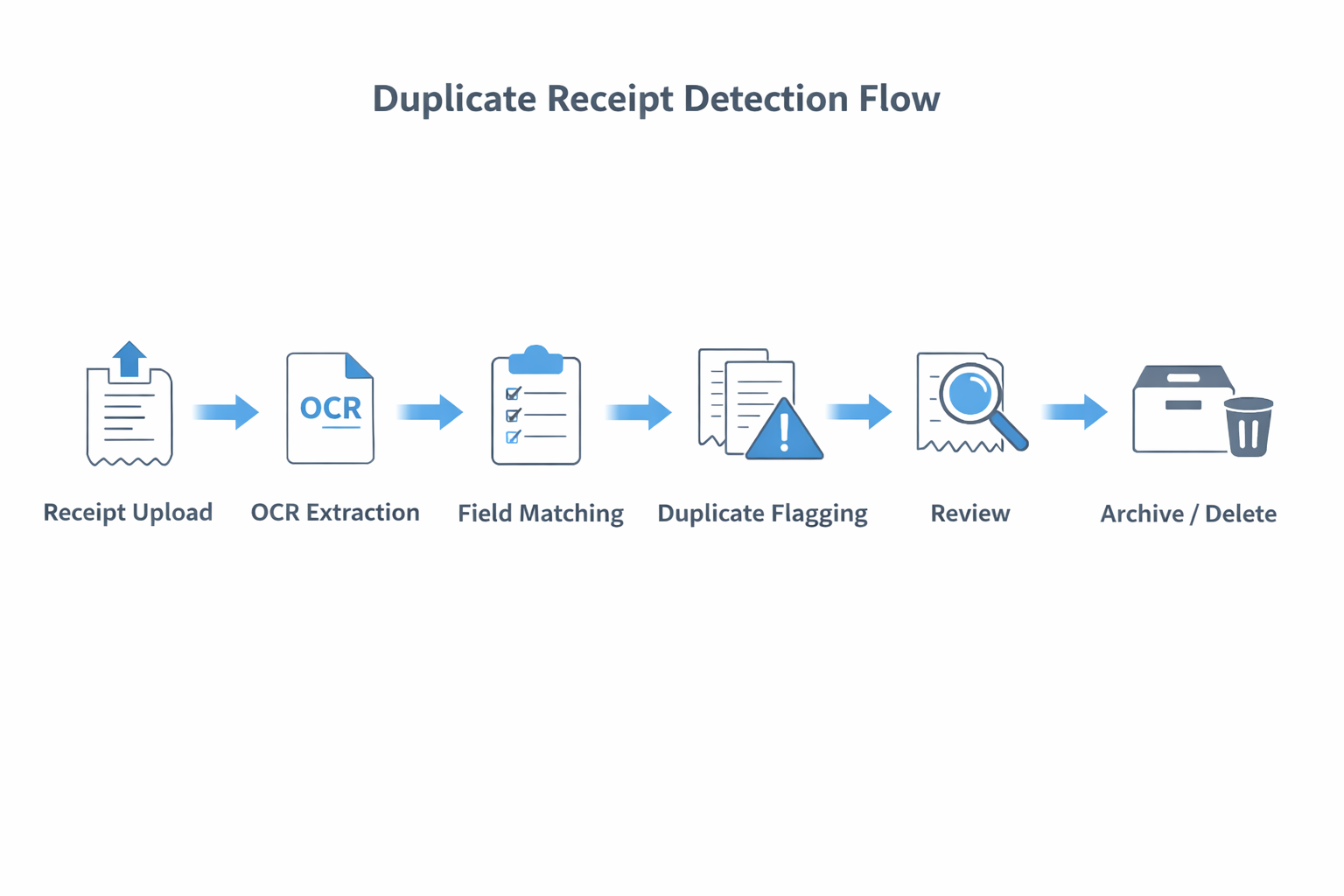
Fastest approach: Upload all receipts → Extract structured fields (Vendor, Date, GST/VAT, Invoice No, Total) → Run duplicate comparison → Flag exact and near matches → Review → Archive or delete duplicate.
🧾 How to Detect Duplicate Receipts (Process)
- Step 1: Collect all receipts – Scan paper, upload PDFs, import credit card statements.
- Step 2: Standardize data fields – Extract vendor name, invoice number, transaction date, subtotal, tax amount, total amount.
- Step 3: Run duplicate check – Compare exact match (invoice + amount) and near match (date ±1 day, amount ±1%).
- Step 4: Review flagged entries – Confirm same invoice, same tax breakdown, same transaction reference.
- Step 5: Resolve – Delete duplicate, merge attachments, or mark as verified.
6️⃣ Comparison Table: Detection Methods
| Detection Method | Accuracy | Detects Near Duplicates | Time Required | Audit Safe | Recommended |
|---|---|---|---|---|---|
| Manual Excel sorting | Medium | No | High | Medium | ❌ |
| Basic accounting software | Medium | Limited | Medium | Medium | ⚠️ |
| OCR + AI matching | High | Yes | Low | High | ✅ |
| ReceiptRecon structured scan | Very high | Yes | Very low | High | ✅✅ |
7️⃣ Warning Signs of Duplicate Receipts
- Same invoice number appears twice
- Same vendor + same total
- Duplicate GST amount
- Repeated reimbursement claims
- Multiple uploads within minutes
- Slightly modified PDF name (e.g. invoice_final_v2.pdf)
8️⃣ How ReceiptRecon Detects Duplicate Receipts
ReceiptRecon extracts structured invoice fields, generates a transaction fingerprint, and detects exact duplicates, near duplicates, and same invoice with different file name. It flags GST/VAT duplication and maintains an audit trail.
Unlike manual methods, it compares vendor name similarity, invoice hash, date proximity, tax percentage match, and line items. See receipt scanning and audit-ready reports.
📊 Duplicate Receipt Detection Flow
🔍 Duplicate Receipt vs Legitimate Reissue
| Scenario | Duplicate? | Explanation |
|---|---|---|
| Same invoice uploaded twice | Yes | Duplicate entry |
| Revised invoice with new number | No | Valid correction |
| Credit note issued | No | Separate transaction |
| Same amount, different invoice number | Possibly | Needs review |
| Digital + scanned copy entered separately | Yes | Same transaction |
🔐 Best Practices to Prevent Duplicate Receipts
- Centralize expense uploads
- Restrict manual entries
- Use invoice number validation
- Sync bank feeds properly
- Reconcile monthly
- Enable duplicate alerts
- Maintain a digital archive
📈 Why This Matters for Tax Compliance
Tax authorities require unique invoice reference, correct GST/VAT input credit, and a clean audit trail. Duplicate claims may result in ITC rejection, penalties, audit notice, and delayed refunds. Proper receipt management reduces compliance risk.
✅ Final Takeaway
Duplicate receipts silently drain profits, create audit risks, and distort financial reports. Manual detection is unreliable; AI-based structured detection is scalable.
ReceiptRecon helps businesses detect duplicates automatically, prevent fraud, maintain tax compliance, and stay audit-ready.
Related Resources
Disclaimer: This content is for informational purposes only. Consult a qualified professional for tax or compliance advice.
🎯 Stop Duplicate Receipts Before They Hit Your Books
ReceiptRecon detects exact and near-duplicate receipts automatically, flags GST/VAT duplication, and keeps your expense records audit-ready.