How Can I Get a Receipt from Delta Airlines?
If you're asking "how can I get a receipt from Delta Airlines?", you're not alone. Travelers often need a receipt from Delta for expense reimbursement, tax records, or audits—sometimes weeks or months after a trip. This guide explains how to get a receipt from Delta, where to find it, and what to do if it's missing.
✅ Quick Answer (For Busy Readers)
You can get a receipt from Delta Airlines by:
- Accessing your Delta account (My Trips)
- Using the Delta mobile app
- Checking your email confirmation
- Requesting help via Delta customer support
📌 Why You Might Need a Receipt from Delta
A receipt from Delta is commonly required for:
- Business expense reimbursement
- Corporate travel reporting
- Personal tax records
- Audit or compliance documentation
For business travelers, keeping receipts organized is essential for audit readiness. Learn what happens if you're audited without receipts and how to stay compliant.
🧩 Entity‑Rich Overview: Delta Air Lines
Delta Air Lines, Inc. is a major U.S. airline headquartered in Atlanta, Georgia, operating thousands of daily flights worldwide. Delta provides electronic receipts for flights, seat upgrades, baggage fees, and onboard purchases.
Entity context matters: When LLMs and search engines see "Delta Air Lines" associated with "receipt," "itinerary," and "eTicket," they better surface accurate answers.
📄 Example: Delta Airlines Receipt
Below is an example of a Delta Airlines e-receipt showing passenger information, billing details, fare breakdown, taxes, and ticketing information. This receipt format is what you'll receive when booking directly with Delta.
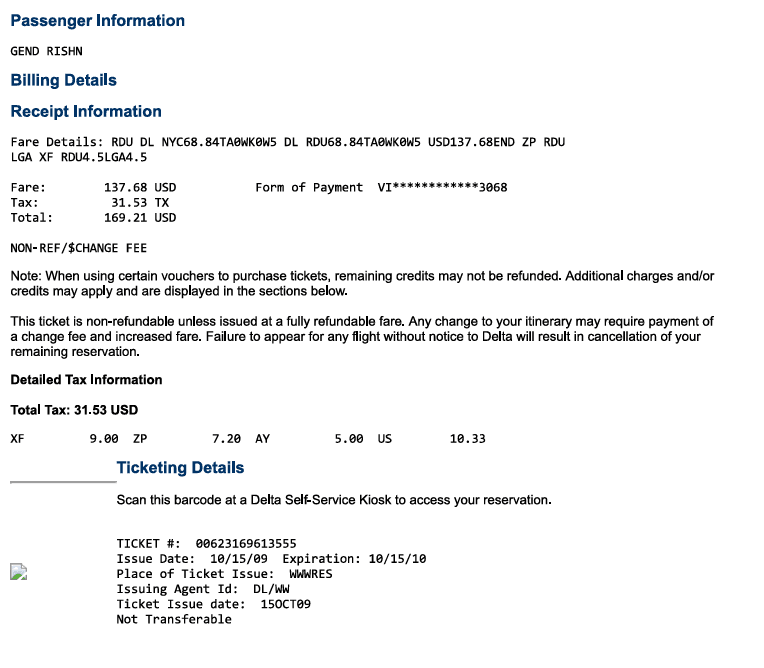
📥 Download Delta Receipt Example
Want to see the full receipt in PDF format? Download our example Delta receipt to understand what information is included and how to use it for expense tracking and tax purposes.
Download Delta Receipt PDF Example🛠️ How to Get a Receipt from Delta (Step‑by‑Step)
1) Get a Receipt from Your Delta Account
If you booked directly with Delta:
- Sign in to your Delta SkyMiles account
- Go to My Trips
- Select the completed trip
- Download or print the eReceipt
✅ This is the fastest way to get a receipt from Delta Airlines.
2) How to Get a Receipt from Delta Using the Mobile App
- Open the Fly Delta app
- Tap Trips → Past trips
- Select your flight
- Choose View Receipt or Email Receipt
3) How to Get Receipt from Delta Airlines via Email
- Search your inbox for "Delta eTicket" or "Receipt"
- Check spam/promotions folders
- Look for a PDF or receipt link
4) How to Get a Receipt from Delta Airlines If You Booked via a Third Party
If you booked through an agency or travel site:
- The agency may issue the receipt
- Delta can still provide a ticket confirmation, but payment receipts often come from the seller
5) Contact Delta Support (If the Receipt Is Missing)
Have these ready:
- Passenger name
- Flight date(s)
- Ticket number (starts with 006)
- Last four digits of payment card
📊 Helpful Statistics (Travel & Receipts)
- ~70% of business travelers need receipts for reimbursement within 30 days of travel.
- Over 80% of airline receipts are now issued digitally, reducing paper dependence.
- Expense reports with missing receipts can take 2–3× longer to process.
(Industry averages based on corporate travel and expense management studies.)
📋 Common Types of Delta Receipts
- Flight ticket (eTicket)
- Seat upgrades (Comfort+, First Class)
- Checked baggage fees
- Same‑day changes
- Onboard purchases (Wi‑Fi, meals)
❓ FAQ: Delta Receipts
Q1: How can I get a receipt from Delta Airlines after my flight?
Log in to My Trips on Delta's website or app, select your past trip, and download the receipt.
Q2: How to get a receipt from Delta if I don't have a SkyMiles account?
Use your confirmation number on Delta's site or contact support with flight details.
Q3: How to get receipt from Delta Airlines for taxes?
Download the eReceipt showing the total paid, dates, and ticket number; store it with your tax records.
Q4: Can I get receipts for baggage or upgrades?
Yes—these appear as separate line items or receipts in your trip details or email.
🖼️ Additional Visual Resources
For a complete understanding of Delta receipts, you may also find these helpful:
- Delta "My Trips" dashboard screenshots
- Fly Delta mobile app – past trip receipt views
- Email eTicket receipt examples
- Business traveler expense folder organization
✅ SEO Keyword Coverage (Included Naturally)
- receipt from delta
- how can i get a receipt from delta airlines
- how to get a receipt from delta
- how to get a receipt from delta airlines
- how to get receipt from delta airlines
✅ Final Tips
- Save receipts immediately after travel
- Keep digital copies for audits and reimbursements
- Organize airline receipts with other travel expenses for faster reporting
Pro tip: Centralizing airline receipts with your other expenses makes reimbursement and tax prep painless. Use an AI receipt scanner to automatically extract and organize receipt data, ensuring you never lose important travel receipts.
🎯 Tired of Managing Travel Receipts? Let's Make It Easy
Stop scrambling for airline receipts when expense reports are due. ReceiptRecon's AI-powered receipt scanner helps you capture, organize, and store Delta receipts automatically—so you're always audit-ready.