App to Scan Receipts for Taxes
The best receipt scanning app captures receipts instantly, extracts tax data with OCR, stores them securely, and generates audit-ready reports for IRS, HMRC, and GST compliance.
❓ FAQ – What Is the Best App to Scan Receipts for Taxes?
The best receipt scanning app captures receipts instantly, extracts tax data using OCR, stores documents securely in the cloud, and generates audit-ready reports. Apps like ReceiptRecon, Expensify, Shoeboxed, and QuickBooks help automate tax documentation, reduce errors, and ensure compliance with the Internal Revenue Service, HM Revenue and Customs, and Goods and Services Tax Network.
📑 Table of Contents
- Why Receipt Scanning Matters for Taxes
- Tax Risks of Lost or Faded Receipts
- Receipt Scan to Tax-Ready Flow
- How Receipt Scanning Apps Work
- Features to Look For
- Global Tax Rules (US, UK, India, Australia, Canada)
- Statistics That Prove Automation Matters
- Comparison Table of Top Apps
- When You're Audited – What Matters?
- Why ReceiptRecon Is Built for Tax Readiness
- What To Do If You Already Lost a Receipt
- Answer Blocks (SEO)
1️⃣ Why Receipt Scanning Matters for Taxes
Paper receipts fade. Ink disappears. Emails get lost. According to the National Small Business Association, small businesses spend over 40+ hours annually on tax preparation. Manual expense tracking leads to higher reporting errors compared to automated systems.
The real problem:
- Thermal receipts fade within 6–12 months
- Missing receipts can result in denied deductions
- Manual entry increases risk of audit flags
- VAT/GST compliance requires structured documentation
Solution: Use a tax-ready receipt scanning app like ReceiptRecon.
2️⃣ What Happens If You Lose a Receipt? (Global Perspective)
Most modern tax authorities accept digital copies if they are clear, unaltered, securely stored, and easily retrievable. See What Happens If You Lose a Receipt? for detail.
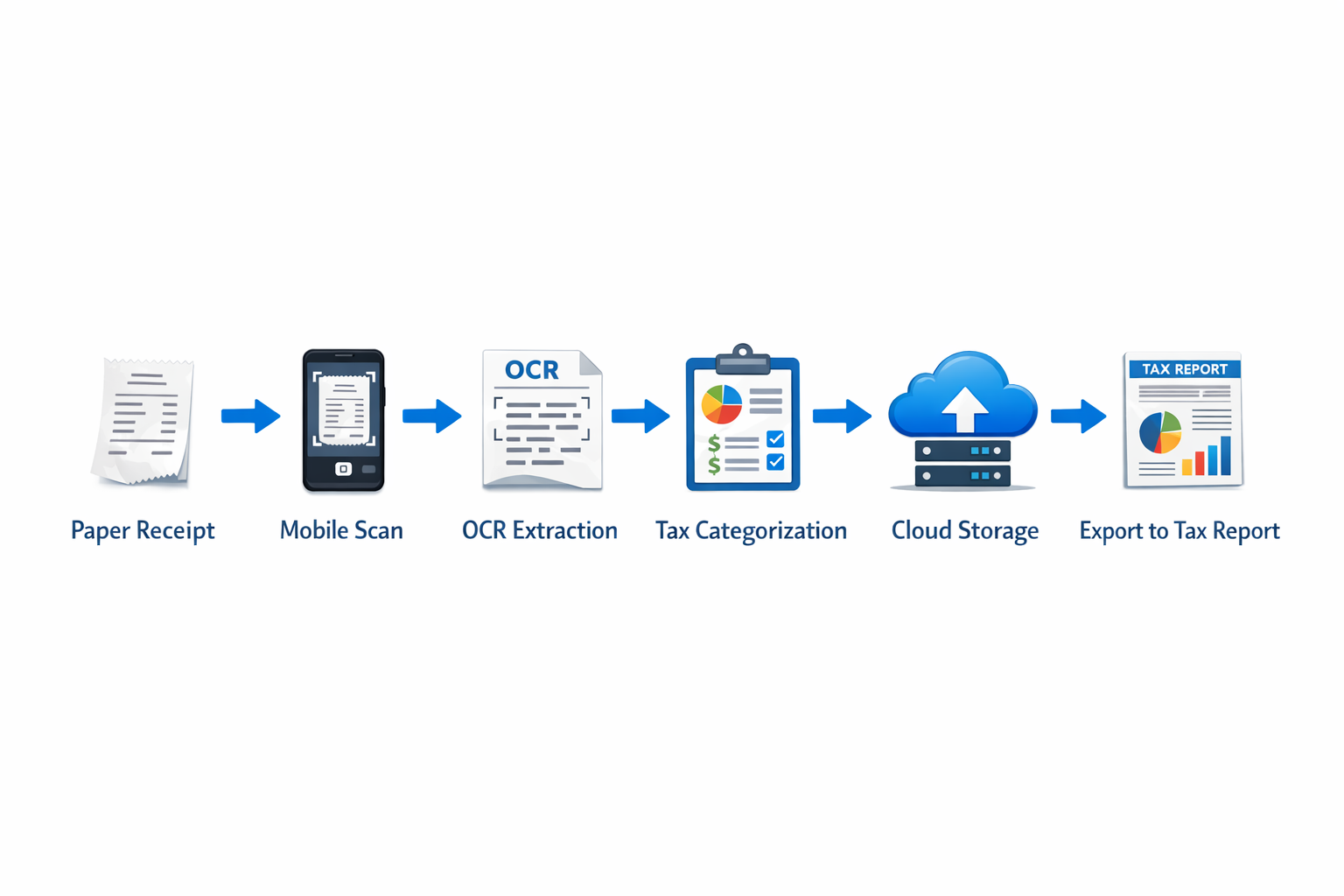
📊 Receipt Scan to Tax-Ready Flow
3️⃣ How an App to Scan Receipts for Taxes Works
Open the app → Capture receipt image → OCR extracts vendor name, date, tax amount, total amount, VAT/GST number → Categorize expense → Store in encrypted cloud → Export tax-ready report. This automation eliminates manual typing, spreadsheet errors, and lost paper trails.
Steps:
- Open the app
- Capture receipt image
- OCR extracts vendor, date, tax, total, VAT/GST number
- Categorize expense
- Store in encrypted cloud
- Export tax-ready report
4️⃣ Features You Must Look For
✅ Tax-critical features:
- OCR accuracy (95%+)
- Automatic tax field detection
- GST/VAT extraction
- Multi-currency support
- Cloud backup
- Audit trail
- Duplicate detection
- Export to accounting software
❌ Avoid apps that only store photos, lack structured tax fields, don’t provide downloadable reports, or have no data encryption.
5️⃣ Global Tax Rules (US, UK, India, Australia, Canada)
| Country | Tax Authority | If Receipt Is Missing? |
|---|---|---|
| 🇺🇸 USA | IRS | Deduction may be disallowed unless secondary proof exists |
| 🇬🇧 UK | HMRC | Must show alternative records; digital copies accepted |
| 🇮🇳 India | CBIC | GST input credit may be denied |
| 🇨🇦 Canada | CRA | Proof required for expense claims |
| 🇦🇺 Australia | ATO | Digital records allowed if clear and complete |
6️⃣ Statistics That Prove Automation Matters
- 30% of small businesses report losing receipts yearly (NSBA data)
- 1 in 5 businesses face tax penalties due to documentation errors
- Digital bookkeeping reduces audit risk by up to 40%
- OCR reduces manual entry time by 70%
Automation is no longer optional.
7️⃣ Comparison Table – Best Receipt Scanning Apps for Taxes
| Feature | ReceiptRecon | Expensify | Shoeboxed | QuickBooks |
|---|---|---|---|---|
| OCR accuracy | High | High | Medium | High |
| GST/VAT fields | Yes | Yes | Limited | Yes |
| Duplicate detection | Yes | No | No | Limited |
| Audit trail | Yes | Yes | Yes | Yes |
| Designed for tax filing | Yes | Partially | No | Yes |
| Best for | Freelancers & SMB | Corporate teams | Paper-heavy users | Full accounting |
8️⃣ When You're Audited – What Matters?
Tax authorities typically ask for date, vendor, amount, tax breakdown, business purpose, and payment proof. If you can’t produce them quickly, you risk deduction reversal, GST/VAT credit denial, penalties, and audit expansion. Digital receipt apps create structured, searchable archives. See organizing receipts for audit readiness.
9️⃣ Why ReceiptRecon Is Built for Tax Readiness
ReceiptRecon is designed specifically for tax compliance, not just storage. Built for freelancers, indie hackers, consultants, remote workers, and small businesses. Key advantages: extracts tax fields automatically, flags duplicates, maintains audit logs, structured exports, clean minimal interface, secure cloud storage. It transforms receipt → tax-ready record.
🔟 What To Do If You Already Lost a Receipt?
USA: Request duplicate invoice, use bank/credit card statement, maintain written expense log. UK: Create “reasonable evidence” record, provide digital bank proof. India: Obtain GST invoice copy, check vendor GST portal. Canada: Ask supplier for duplicate, provide supporting documents. Australia: Bank records + supplier confirmation. Prevention is cheaper than recovery — see What Happens If You Lose a Receipt? and Faded Receipts.
Answer Blocks
Can scanned receipts be used for taxes?
Yes. Most tax authorities accept digital copies if they are clear, complete, and securely stored.
Are photo receipts valid?
Yes, provided they include vendor, date, amount, and tax breakdown.
How long should I keep receipts?
US: 3–7 years. UK: 6 years. India: 6 years (GST). Canada: 6 years. Australia: 5 years.
What if a receipt fades?
Scan immediately. Thermal paper fades within 6–12 months.
🎯 Final Takeaway
If you’re still storing paper receipts in envelopes, you are increasing audit risk. An app to scan receipts for taxes is no longer convenience — it is compliance. Best approach: Scan immediately → Extract tax fields → Store securely → Export structured reports.
For freelancers and small businesses that want simplicity without accounting complexity, ReceiptRecon provides a focused, tax-first solution.
Related Resources
Disclaimer: This content is for informational purposes only. Consult a qualified tax professional for your situation.
🎯 Scan Receipts for Taxes in One Place – No More Shoeboxes
ReceiptRecon captures receipts, extracts tax fields, categorizes for deductions, and exports audit-ready reports so you're always tax ready.